


Every assessment should help educators move more quickly from data to action. That’s why we’re continuing to enhance Renaissance DnA with updates designed to reduce administrative tasks, streamline assessment workflows, and deliver clearer insight into student learning. Whether you’re reviewing student writing, measuring understanding more accurately, or analyzing results across schools and districts, these enhancements help you spend less time managing data and more time supporting instruction and student growth.
Here’s a look at what’s new:
Improved Student Writing Response Downloads
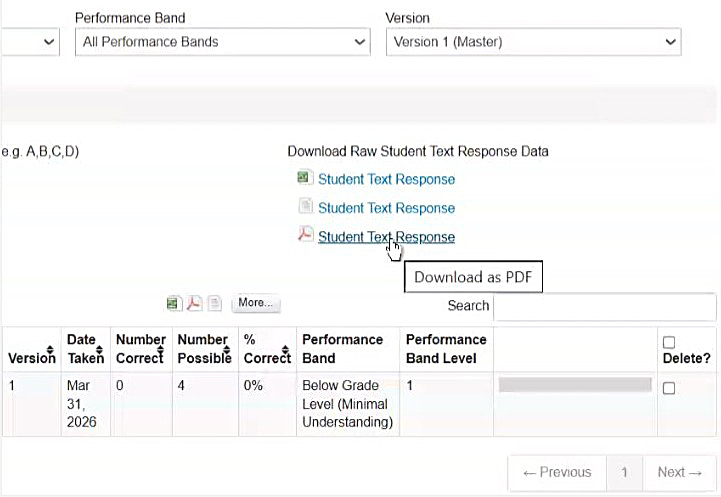
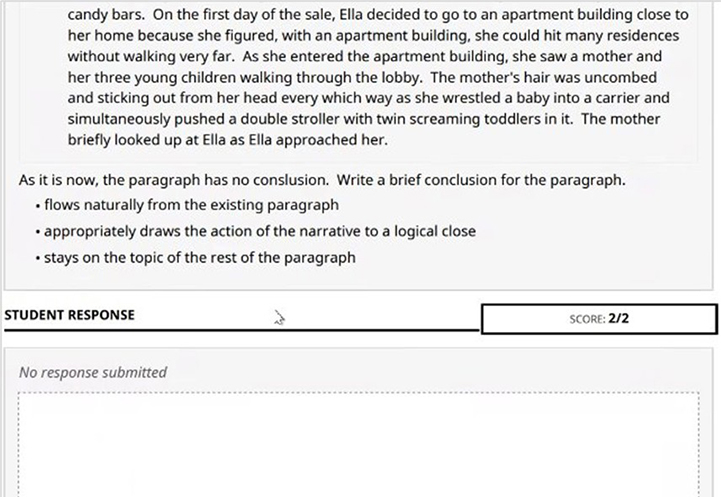
Student text responses can now be downloaded as formatted PDFs, making it easier to review, share, and archive student writing. Each Constructed Response (CR) appears on its own printer-friendly page with original formatting preserved, along with assessment details, prompts, and student information. Whether preparing for collaborative planning, building student portfolios, or reviewing student work over time, educators can access writing samples in a format that’s ready to use—without the need for manual formatting.
What this means for you:
- View student essays with original formatting intact for more accurate and efficient review
- Access key assessment details at a glance, including student name, ID, assessment, and date
- Easily compile writing portfolios or share examples during instructional planning conversations
- Spend less time preparing and organizing student work so you can focus on feedback and instructional planning
Learn more: Review the Student Writing Response release notes for additional details
More Flexible Scoring with Partial Credit Options
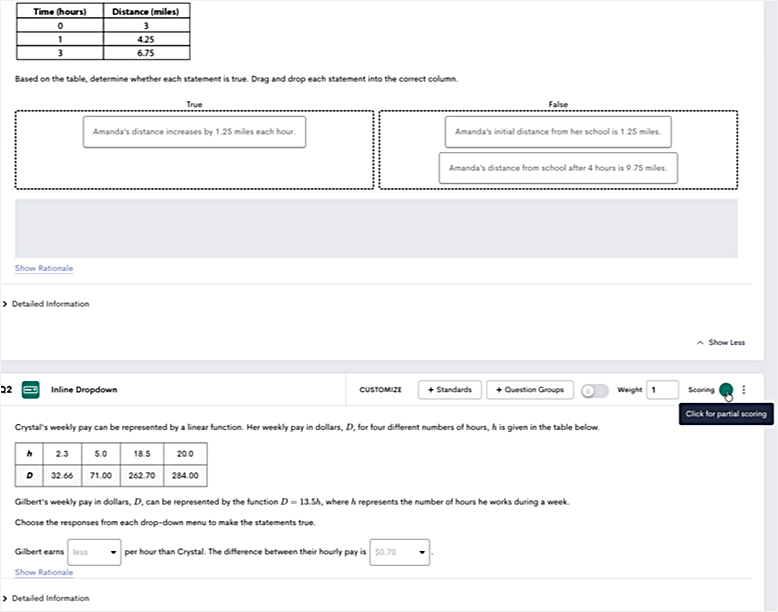
DnA Item Bank now supports partial scoring for Inline Dropdown and Classification items, giving educators a more accurate picture of student understanding. Rather than measuring responses as simply correct or incorrect, partial scoring can recognize what students know while identifying where misconceptions remain. This added flexibility supports more meaningful assessment results and helps educators make instructional decisions with greater confidence. Partial scoring can be turned on or off within the existing assessment-building workflow.
With this update, you can:
- Award partial credit for Inline Dropdown and Classification items
- Gain deeper insight into student understanding by recognizing partially correct responses
- Better identify learning gaps and instructional next steps
- Customize scoring approaches to align with assessment goals and instructional priorities
Learn more about creating and using these item types:
- Create an Inline Dropdown Item
- Create a Classification Item
- Item Types: Overview and Best Practices for Using
Streamlined Reporting with New CSV Downloads
You can now download Multiple Assessment and Progress Learning pre-built reports as raw CSV files, making it easier to analyze and work with assessment data outside the platform. Exported files include student details, composite scores, and school/site information, with columns automatically adjusted based on selected grouping criteria. By reducing the time spent preparing and organizing report data, educators and district leaders can more quickly identify trends, monitor performance, and focus on planning next steps for instruction and support.
Rolling out in phases: CSV export is currently available for Progress Learning Pre-ACT and ACT Student Roster reports. Additional Progress Learning summaries and Multiple Assessment reports will gain CSV export support in releases beginning August–September 2026, expanding access to downloadable raw data across even more reporting workflows.
This added flexibility makes it easier to incorporate assessment data into existing reporting and planning processes without extra work.
What this means for you:
- Instantly sort, filter, and analyze data—no cleanup required
- View district-wide data in a single file, including school and site information
- Spend less time preparing reports and more time identifying trends and opportunities for intervention
- Make it easier to share data with stakeholders and support data-informed planning across schools and districts
- Access downloadable report data across an expanding set of Progress Learning and Multiple Assessment reports as the phased rollout continues

These enhancements are designed to do more than add functionality—they help educators turn assessment insights into meaningful action. From reviewing student writing more efficiently and measuring understanding with greater precision to analyzing reporting data with less effort, DnA continues to evolve to support informed decision-making at every level. The result is less time spent managing processes and more time focused on instruction, intervention, and helping students succeed.