


Scoring open-ended student responses is an important part of understanding students’ thinking—but it can also take significant time for educators. That’s why we’re introducing a redesigned Teacher Scoring experience in SchoolCity for Constructed Response and Writing Prompt items in Item Bank Assessments.
The new scoring experience is designed to help educators work more efficiently with a cleaner, more intuitive interface that makes it easier to review student work, navigate between responses, and apply rubric-based scoring:
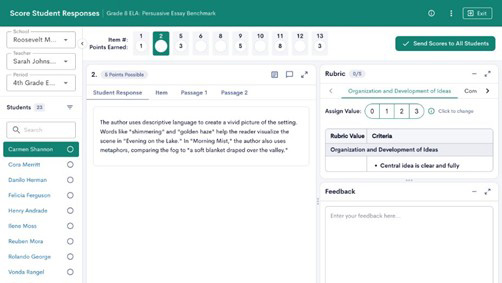
Educators will continue accessing scoring through the familiar workflow in Manage Assessments using the newly renamed Score Student Responses button.
Within the updated experience, educators can:
- More easily navigate between students and responses
- Streamline rubric-based scoring workflows
- Review open-ended responses in a modernized interface
- Access future AI-assisted scoring tools within the same workflow
This redesigned scoring experience helps reduce friction during the grading process so educators can focus more on evaluating student thinking and less on navigating tools. It also lays the foundation for future enhancements, including upcoming AI-assisted scoring capabilities designed to help educators streamline evaluation of open-ended responses even further.
By modernizing the scoring workflow while keeping familiar access points in place, the new experience supports greater efficiency without requiring educators to learn an entirely new process.
Check out this article to learn more about the new scoring experience.