
Every school and district has unique needs when it comes to student reading access. To help meet these diverse needs, myON provides tools that let building and district administrators manage which books are visible for each student by grade level. Now, we’re adding the ability to manage content access for individual students, giving administrators more precision and flexibility.
How individual student book visibility works
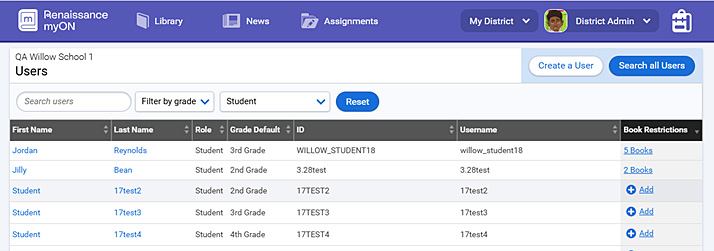
Administrators can now manage student-level book visibility directly from the myON Users page through a new Book Restrictions column. From there, they can search the entire myON library and select one or more titles to apply restrictions individually or in bulk.
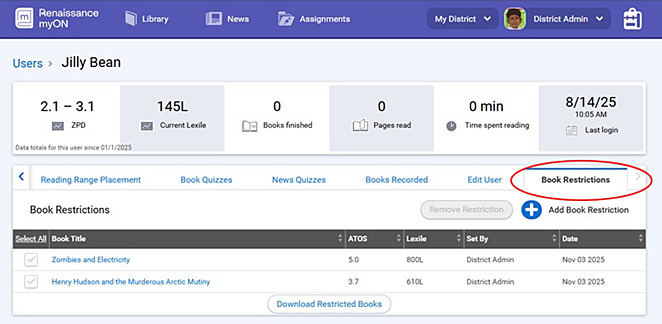
myON presents restricted titles in a clear table showing book details, reading levels, who the restriction was set by, and removal options. An audit trail tracks all changes, while teachers maintain view-only access to see which books are restricted for their students, helping them to plan lessons and support students more effectively.
Why the new restrictions matter
This new functionality eliminates the need for broad, system-wide book removals that affect entire grade levels. It allows schools to honor family preferences while meeting compliance requirements without disrupting the wider student population.
- For administrators, it streamlines workflows, reduces manual work, and supports transparency.
- For educators, it minimizes disruption to curriculum and library services.
- For families, this new feature helps schools and districts navigate individual family preferences while maintaining consistent access to myON library materials for all students.
The myON team actively stays in touch with schools and districts to respond to their needs. If you have questions, please visit our Support page.