
Reading comprehension quizzes are central to a student’s reading journey, and the way students interact with them can make a difference in engagement and comprehension. To provide additional support and flexibility, every Accelerated Reader (AR) quiz now offers full audio coverage so every question and answer choice can be heard as students work through a quiz.
Audio support helps students engage with quizzes in ways that work best for them. Emergent Bilingual learners can hear each question and answer clearly, supporting comprehension and language development. Students developing fluency can follow along with pacing and phrasing, while others may use audio to maintain focus and confidence throughout the quiz. With every quiz offering the same audio experience, students will have a consistent and reliable way to engage with Accelerated Reader quizzes.
Where to find audio support in AR
When students are ready to take a quiz and indicate how they read the book, they can select Yes to have the quiz read aloud. The questions and answer choices will play automatically, and students can pause at any time to reflect before answering.
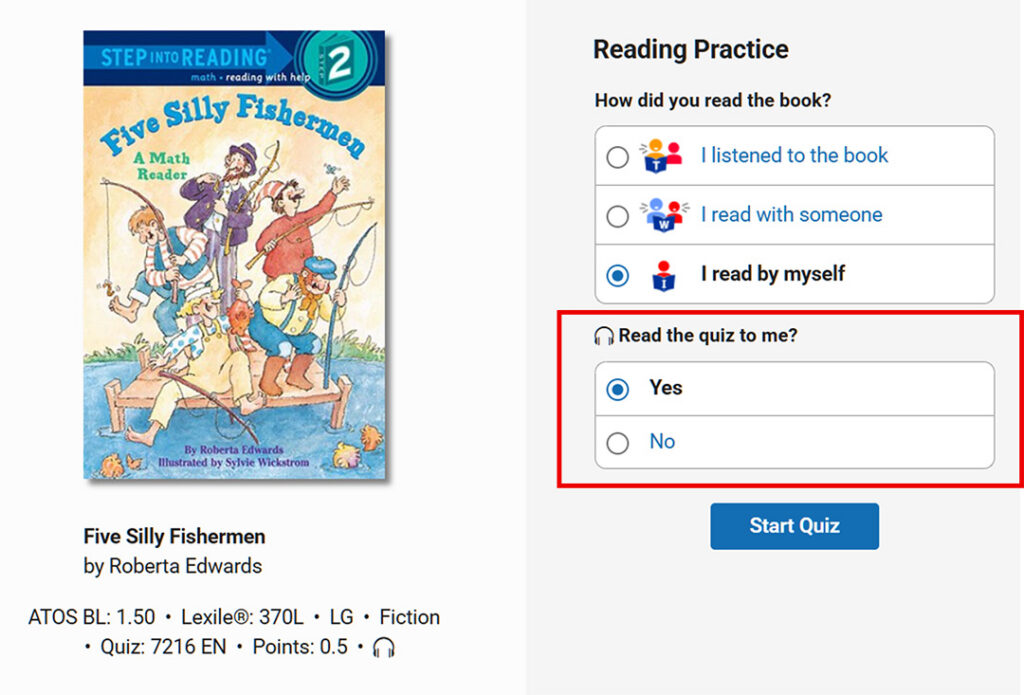
By default the audio is already set to “Yes’’ for every quiz, but administrators and teachers can turn audio off for individual students in the Recorded Voice Preference located in Quiz Settings. This flexibility allows educators to manage how and when audio is used, making it adaptable to instructional needs.
AR supports core instruction
With over 220,000 quizzes in its library, Accelerated Reader supports core instruction across a range of genres and academic subjects including science, social studies, and math, while helping students build reading comprehension and vocabulary. For a closer look at what’s in the AR quiz collection, explore this infographic detailing the library.